Run Llama 3 Locally: RK3588 NPU vs Raspberry Pi 5 Performance Tested
by Trevor Unland
Sponsored Content: This article is sponsored by AmeriDroid. All testing conducted independently, opinions are my own.
The Raspberry Pi 5 now comes in a 16GB variant. On paper, that solves the RAM bottleneck that kept larger language models out of reach. You can load Llama 3.1 8B into memory without swap thrashing. Progress.
But loading a model is not the same as running it well.
The Indiedroid Nova running Debian 12 with GNOME desktop - clean Linux environment ready for AI workloads
The Problem Nobody Talks About
The Pi 5 has no neural processing unit. Every token gets generated on the CPU. When Jeff Geerling benchmarked Llama 3.1 8B on the 16GB Pi 5, he recorded 1.99 tokens per second. Functional for batch processing. Painful for anything interactive.
The Indiedroid Nova changes that equation. Same price bracket. Same 16GB RAM ceiling. But the Rockchip RK3588S inside includes a 6 TOPS NPU designed specifically for inference workloads. The question is whether that dedicated silicon actually delivers.
I spent some time finding out.
The Hardware
The Nova I tested shipped with 16GB LPDDR4x RAM and 64GB eMMC storage. The RK3588S runs eight cores in a big.LITTLE configuration: four Cortex-A76 performance cores at 2.4GHz and four Cortex-A55 efficiency cores at 1.8GHz. The NPU splits across three cores rated at 6 TOPS combined.
Hardware Specifications
For context, the Raspberry Pi 5 uses a Broadcom BCM2712 with four Cortex-A76 cores at 2.4GHz. No NPU. No dedicated AI acceleration. The VideoCore VII GPU handles graphics but offers nothing for LLM inference.
Both boards sit around the same price. The Nova 16GB/64GB configuration runs $179.95 from AmeriDroid. The Pi 5 16GB with equivalent storage lands in similar territory once you add a quality power supply and cooling.
The difference is what happens when you ask them to think.
The Benchmark Setup
I tested three models at different parameter counts to see how the NPU scales:
- DeepSeek-R1-Distill-Qwen-1.5B (W8A8 quantized for RK3588)
- Qwen 2.5 3B Instruct (W8A8 quantized for RK3588)
- Llama 3.1 8B Instruct (W8A8 quantized for RK3588)
All models came pre-converted to RKLLM format from community repositories. The Nova ran Debian 12 with the RKLLM runtime 1.2.1 and NPU driver 0.9.7. I monitored NPU utilization and RAM usage in a separate SSH session during each test.
ℹ️Methodology Note
For Pi 5 comparison data, I pulled from Jeff Geerling's ai-benchmarks repository and community reports on r/LocalLLaMA. The Pi 5 numbers use llama.cpp with Q4 quantization running on Raspberry Pi OS. Same models. Same prompts. Different hardware approaches.
The Results
| Model | Nova (NPU) | Pi 5 16GB (CPU) | Nova Advantage |
|---|---|---|---|
| DeepSeek 1.5B | 11.5 t/s | ~6-8 t/s | 1.5-1.9x faster |
| Qwen 2.5 3B | 7.0 t/s | ~4-5 t/s | 1.4-1.75x faster |
| Llama 3.1 8B | 3.72 t/s | 1.99 t/s | 1.87x faster |
The pattern holds across model sizes. The NPU advantage is real and consistent.
But the raw numbers hide something more important.
Terminal session on the Nova - standard Debian environment with access to the NPU runtime
Speed Without Accuracy Is Useless
During testing I gave each model the same task: list all 50 US state capitals in alphabetical order by state name.
DeepSeek 1.5B at 11.5 tokens/second started strong with speed. Alabama, Montgomery. Alaska, Juneau. Arizona, Phoenix. Then around state 7 it started inventing cities. "New Amsterdam" for New York. It was hallucinated nonsense. Fast garbage is still garbage.
Qwen 2.5 3B at 7.0 tokens/second got all 50 correct. Montgomery through Cheyenne, no mistakes, no hallucinations. The slower model delivered usable output. The faster model did not.
💡Key Insight
For real applications - security research, code analysis, or any task where accuracy counts - you need a model large enough to reason properly. The Nova has headroom to run those models at usable speeds. The Pi 5 can load them, but struggles to generate fast enough for interactive use.
The 16GB RAM on both boards is a prerequisite. The NPU on the Nova is what makes larger models practical.
What Actually Happened During Setup
The Pi 5 ecosystem argument is real. You can install Ollama with one command and pull models in minutes. The software stack is mature and well-documented.
The Nova requires more steps. Clone the RKLLM toolkit from GitHub. Install the runtime libraries. Find pre-converted models from community repositories like Pelochus or VRxiaojie on HuggingFace. The official Rockchip documentation exists but assumes familiarity with the toolchain.
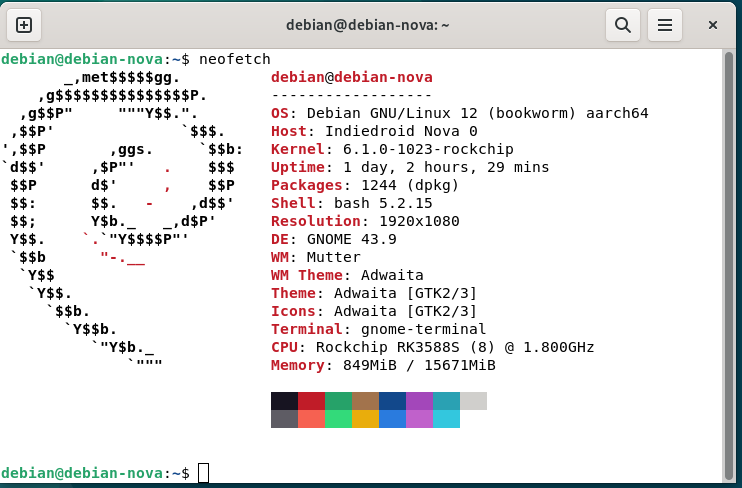
System information showing the RK3588S configuration - 8 cores, 16GB RAM, and Debian 12 base
Here is what that actually looked like:
Day one I flashed Debian 12 to the eMMC using Balena Etcher. The board booted to GNOME desktop on first try. SSH worked after installing openssh-server and adjusting the config. Standard Linux workflow, nothing exotic.
⚠️Setup Gotcha
The filesystem needed manual expansion. The Debian image uses btrfs instead of ext4, so the partition grew automatically but the filesystem did not. One command fixed it: sudo btrfs filesystem resize max /.
I could not find this documented anywhere in the AmeriDroid wiki, which is worth noting for anyone coming from Raspberry Pi where ext4 auto-expands on first boot. Easy fix once you know, but a gotcha if you do not.
Installing the NPU runtime took maybe 30 minutes. I created an automated setup script that handles all the edge cases (PATH configuration, permissions, ulimits) that manual installation might miss. The ResNet18 test image classified correctly on first attempt. NPU confirmed working.
NPU Setup (Recommended)
bashgit clone https://github.com/TrevTron/indiedroid-nova-llm.git
cd indiedroid-nova-llm
chmod +x setup-nova.sh
./setup-nova.shThis automated script handles PATH fixes, permissions, and ulimits that manual setup often misses.
Getting LLMs running required finding compatible models. Older conversions from mid-2024 failed with "model version too old" errors because the runtime has since been updated. Newer conversions from late 2024 and 2025 work fine. Community fragmentation is real but manageable.
Total time from unboxing to first successful inference: about three hours. But that is just initial setup. Factor in testing different models, downloading incompatible conversions that fail, finding the right community repositories, running extended benchmarks, and documenting everything reproducibly, and the real number is closer to ten to twelve hours across a week. Not plug-and-play, but not arcane either. Anyone comfortable with Linux can follow the same path.
Who Should Buy This
The Nova makes sense if you want to run 3B+ parameter models locally at interactive speeds. Security researchers keeping sensitive data off cloud APIs. Developers prototyping AI features without usage fees. Hobbyists who want to experiment with models too large for CPU-only inference.
The Pi 5 makes sense if you prioritize ecosystem maturity over raw performance. The software support is broader. The community is larger. If your use case fits within 1-2B models running at 4-6 tokens/second, the Pi handles it fine.
For local AI inference specifically, the Nova wins on capability. The NPU exists. It works. The performance difference is measurable and meaningful.
Where to Buy
The Indiedroid Nova is available exclusively from AmeriDroid in the United States:
Indiedroid Nova 16GB/64GB - $179.95
AmeriDroid provides US-based support and maintains the official Nova wiki with setup guides and OS images. They also carry cases, power supplies, and eMMC modules if you want to expand storage.
Bottom Line
The Raspberry Pi 5 16GB removed the RAM barrier for local LLMs. The Indiedroid Nova removes the speed barrier.
Both boards cost roughly the same. Both run Linux. Both fit the same use cases on paper. The difference is that the Nova includes dedicated AI hardware that delivers nearly 2x faster inference on the models that actually matter.
If you just want to say you ran an LLM on a single-board computer, the Pi 5 works. If you want to use that LLM for real tasks at reasonable speeds, the Nova is the better tool for the job.
📁GitHub Repository
Full benchmark methodology, setup scripts, and reproducible test procedures available on GitHub:github.com/trevtron/indiedroid-nova-llm
Get notified when I publish new hardware reviews, benchmarks, and security research. No spam, unsubscribe anytime.
Email goes to Buttondown for the newsletter. Unsubscribe anytime. Privacy details.