When I first set up my Indiedroid Nova, WiFi simply did not work. The interface existed, but NetworkManager would not use it. nmcli dev status showed wlan0 as unavailable, and the kernel log was full of SDIO timeout errors from the Realtek driver.
I noted it in my setup log, connected Ethernet, and kept moving. The Nova had more interesting work waiting for it. I was testing local models on the RK3588S NPU, working through the board's storage behavior, and using it as the compute side of other hardware projects. A cable was annoying, but it was not enough to stop the work.
That changed when I came back to make the system less dependent on my desk. A small board can be powerful and still become a bad field computer if one ordinary subsystem never becomes reliable. This time I followed the failure all the way through instead of stopping when the driver loaded.
That distinction was the key. The visible driver error was real, but it was only the first failure. The existing module-reload workaround could bring the hardware back and still leave WiFi unusable. Two separate layers were producing one deceptively simple symptom.
What the Failure Looked Like
The initial state looked like a straightforward driver problem. NetworkManager could see a WiFi device, but it could not manage it:
DEVICE     TYPE      STATE         CONNECTION
wlan0      wifi      unavailable   --
The kernel messages pointed in the same direction. The rtw_8821cs probe was reaching the BL-M8821 module over MMC2, timing out during SDIO reads, and then failing to load the firmware:
rtw_8821cs mmc2:0001:1: sdio read32 failed (0x11080): -110
rtw_8821cs mmc2:0001:1: failed to load firmware
rtw_8821cs: probe of mmc2:0001:1 failed with error -22
I was not the first person to see it. The same Nova behavior had been documented in Joshua-Riek/ubuntu-rockchip issue #1007. The issue had been open since August 2024 and was later closed as not planned. The workaround in the discussion was to unload and reload the Realtek modules after boot.
That was a useful clue. It established that the hardware could recover once the rest of the system was up. It did not explain why NetworkManager could remain stuck at unavailable afterward.
The Nova and the Exact System I Tested
This is a narrow fix for a specific hardware and software path, so the test environment matters. The Nova uses a Realtek RTL8821CS inside a BL-M8821 wireless module. It is not a USB WiFi adapter. The device talks to the board over SDIO, which is why the boot timing and MMC2 messages matter.
Tested system
| Board | Indiedroid Nova, RK3588S, 16 GB RAM |
| Wireless module | BL-M8821 |
| WiFi chip | Realtek RTL8821CS |
| SDIO identity | Vendor 024C, device C821 |
| Interface | SDIO through MMC2 |
| Driver | rtw88_8821cs |
| Firmware | rtw8821c_fw.bin, v24.11.0 |
| Operating system | Debian 12 Bookworm |
| Kernel | 6.1.0-1023-rockchip |
The Driver Reload Fixed Only Half of It
The module reload addresses a sequencing problem. During the failing boot, the RTL8821CS driver can initialize before the SDIO path is ready. Removing the related rtw88 modules, waiting, and loading rtw88_8821cs again gives the bus time to settle before the probe runs again.
sudo rmmod rtw88_8821cs rtw88_8821c rtw88_sdio rtw88_core
sleep 2
sudo modprobe rtw88_8821cs
After that sequence, the firmware path could recover. That was progress, but it was not a working network connection. NetworkManager could still report the interface as unavailable.
This is where it is easy to misread the result. If the kernel error disappears, the natural assumption is that the remaining problem must still live in the driver. In this case, the next failure was in userspace. The minimal image did not have wpasupplicant installed.
NetworkManager can discover the interface without that package, but it does not have the component it needs to handle the WiFi authentication path. The recovered driver and the unavailable interface were both telling the truth. The kernel side had improved. The connection manager was still incomplete.
| Layer | Failure | Repair |
|---|---|---|
| Kernel and SDIO | Driver probes too early and firmware loading fails | Reload the rtw88 module chain after the bus is ready |
| Network management | NetworkManager sees wlan0 but cannot manage WiFi | Install wpasupplicant and the supporting wireless packages |
Building the Complete Repair
Once both layers were visible, the repair became ordinary Linux plumbing. I packaged it into one shell script so the result would be repeatable and so nobody else would need to reconstruct the fix from a driver issue, a package list, and a working boot sequence.
git clone https://github.com/TrevTron/indiedroid-nova-wifi-fix.git
cd indiedroid-nova-wifi-fix
chmod +x fix-wifi.sh
./fix-wifi.sh
sudo reboot
The script installs five pieces of the wireless path:
| Package | Role in the repair |
|---|---|
| firmware-realtek | Provides the Realtek firmware files used by the WiFi and Ethernet hardware |
| wpasupplicant | Provides the WiFi authentication component NetworkManager needs |
| wireless-regdb | Provides the regulatory database used for wireless channel rules |
| iw | Provides modern wireless inspection and configuration tools |
| rfkill | Provides visibility into software and hardware radio blocking |
It then creates a oneshot systemd service. The important part is not merely running the same commands at every boot. It is placing them before NetworkManager tries to manage the recovered interface.
[Unit]
Description=Reload RTL8821CS WiFi driver (workaround for SDIO timing bug)
After=network-pre.target
Before=NetworkManager.service
Wants=NetworkManager.service

[Service]
Type=oneshot
ExecStart=/bin/bash -c 'rmmod rtw88_8821cs rtw88_8821c rtw88_sdio rtw88_core 2>/dev/null; sleep 2; modprobe rtw88_8821cs'
RemainAfterExit=yes

[Install]
WantedBy=multi-user.target
The service preserves the manual recovery sequence, but moves it into the boot process. By the time NetworkManager starts working with the interface, the driver has been reloaded and the userspace WiFi dependency is present.
Verification After Reboot
A fix that works only in the shell session where I discovered it is not finished. I rebooted the Nova, checked the device state again, listed the networks NetworkManager could see, and connected over the repaired interface.
nmcli dev status
nmcli dev wifi list
sudo nmcli dev wifi connect "YourSSID" password "YourPassword"
systemctl status fix-wifi.service --no-pager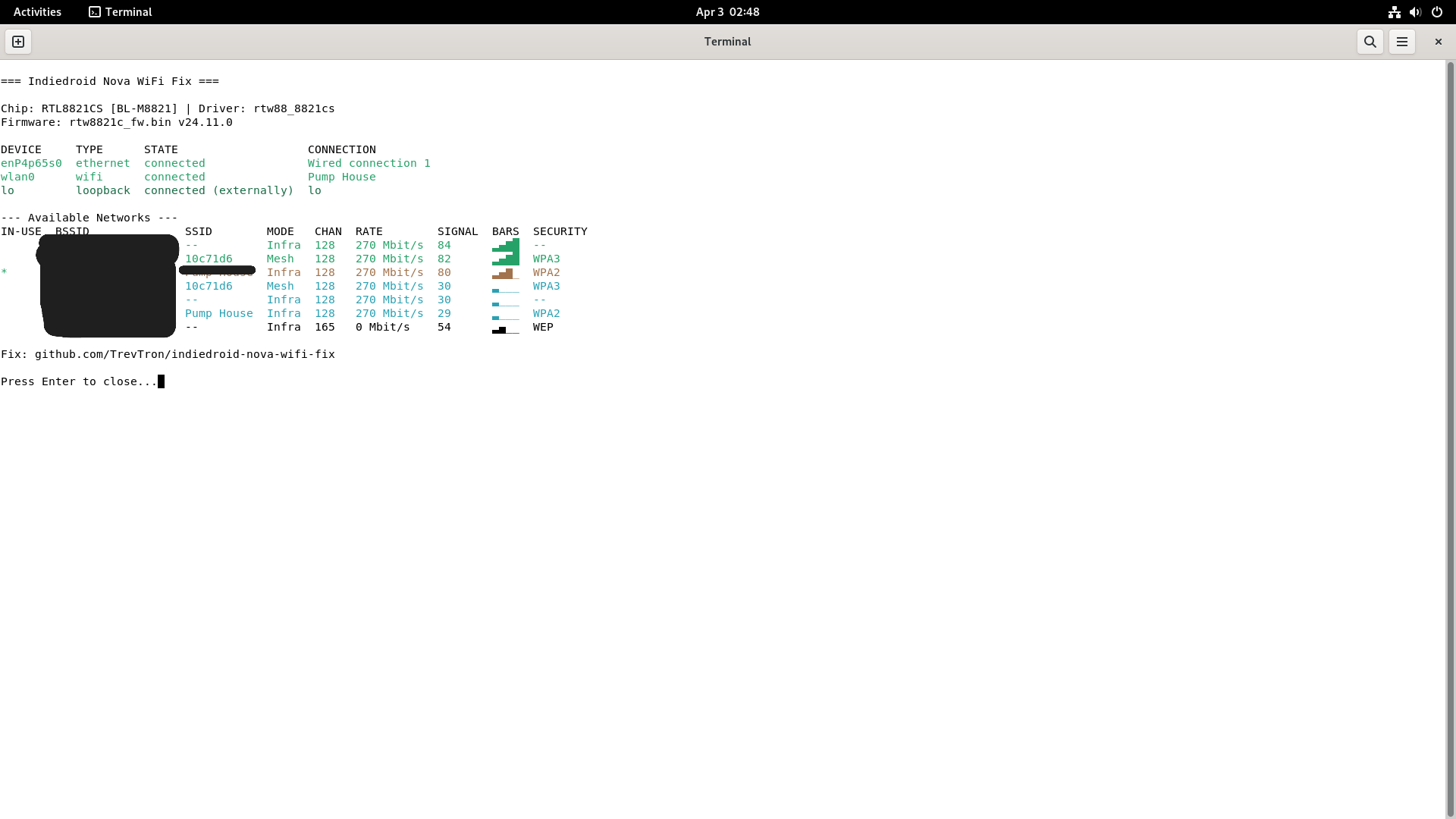
wlan0 is connected, and NetworkManager can enumerate nearby access points. Network names are obscured for privacy.That screenshot is more useful than a clean desktop image because it records the parts of the result that matter: the detected chip and driver, the loaded firmware version, the managed WiFi interface, the active connection, and the visible network scan.
Why This Was Worth Publishing
The Nova is not an abandoned experiment on my shelf. It has run local LLM benchmarks through the RK3588S NPU, served as the compute layer in hardware and RF work, and given me a compact ARM system with enough memory to do real work away from a larger machine. That made the WiFi failure more than a cosmetic flaw.
It also made this a good example of why hardware support problems need end-to-end testing. A kernel fix can be correct without producing a usable system. A userspace package can be missing without producing an obvious package error. If I had stopped when the firmware loaded, I would have documented an incomplete workaround as a solution.
The public repository keeps the automated installer, manual procedure, chip identifiers, systemd unit, package rationale, and verification commands together. The script is small. The useful part is the chain of evidence around it.
Bottom Line
The Nova did not have one WiFi problem. It had a boot-time driver failure and a missing network-management dependency stacked on top of each other.
Reloading the RTL8821CS modules solved the visible kernel failure. Installing wpasupplicantsolved the part that kept NetworkManager from doing anything useful. Putting both into one repeatable installation and boot sequence turned a workaround into a repair.
That is the version I wanted when I first plugged in Ethernet and moved on.
Indiedroid Nova WiFi FAQ
Why does the Indiedroid Nova show wlan0 as unavailable?
On the tested Debian 12 system, two failures were stacked together. The RTL8821CS driver hit an SDIO timing problem during boot, and NetworkManager did not have wpasupplicant available to manage the interface after the driver recovered.
Why is reloading the RTL8821CS module not enough?
Reloading the rtw88 modules can recover the SDIO and firmware initialization path. It does not install the userspace component NetworkManager needs to authenticate and manage WiFi connections.
Which operating system was actually tested?
The completed repair was tested on Debian 12 Bookworm with kernel 6.1.0-1023-rockchip on a 16 GB Indiedroid Nova. Ubuntu 24.04 uses the same general driver path, but that is a compatibility expectation rather than a second completed test.
Does the fix remain active after reboot?
Yes on the tested system. The installer enables a oneshot systemd service that reloads the Realtek driver chain before NetworkManager starts managing the interface.
Related Nova work
My measured local-inference work on the same 16 GB Nova, including RKLLM setup, NPU utilization, model quality, and runtime problems.
The Nova as a practical compute layer inside a portable RF monitoring workstation.
Reproduce the repair
Indiedroid Nova WiFi fix repository
The repository contains the installer, complete manual path, service definition, package notes, tested hardware identifiers, troubleshooting context, and MIT license.
Get notified when I publish new hardware reviews, benchmarks, and security research. No spam, unsubscribe anytime.
Email goes to Buttondown for the newsletter. Unsubscribe anytime. Privacy details.